Mekey for Android
Chunky keys. Clean typing. Nothing leaves your phone.
Mekey is an Android keyboard drawn as real sculpted keycaps: a lip, a gradient cap and a dished plate. Keys travel when you press them and can play recorded switch sounds. Suggestions and autocorrect run on the phone, and the app does not request the INTERNET permission.
APK from GitHub Releases · Android 8.0+ · Free and open source (Apache-2.0)
This keyboard is live. It is built from the app's own drawing code and palettes, and the sounds are the app's switch recordings. Suggestions here come from a 5,000-word slice of the app's English pack.
Typing
Typos fixed on space. Undone with one Delete.
Each letter refreshes the suggestion bar: what you typed on the left, the best guess in bold in the middle, an alternative on the right. Press space and a confident guess replaces the word, so “Thnaks” becomes “Thanks”. Press Delete straight after, and it’s back.
Autocorrect runs only in prose fields. Email and URL fields get suggestions without correction. Password and number fields get neither.
Hold to reveal
Two keys that do more when you hold them.
Number pad
Hold 123. A number pad slides in.
A phone-style 4×4 pad slides in from the left and the letters shift aside, still usable. It has its own delete, space and return, and it stays open as focus moves between one-digit code boxes. A quick tap on 123 still opens symbols.
The globe key
Hold the globe. A menu springs out.
Slide to Settings, Customise or Keyboards and let go, as on iOS. Release without choosing and the menu stays open, so you can tap instead.
Customise keys
Paint your keys.
Select keys on the live keyboard with gestures, then pick a tool. Undo is always one tap away.
- Drag
- across keys to paint a selection
- Double-tap
- a key to select its section: letters, modifiers or the number pad
- Two fingers
- tap to select every key
- Tap the deck
- to clear the selection
- Swipe
- sideways to reach symbols and the number pad
What you can change, per key or per selection
| Colour | Cap colour, from the theme’s roles or any colour, and an optional coloured rim |
|---|---|
| Legend | The label printed on the key |
| Shape | Rounded, square, squircle or round caps · smooth, matte, glossy, frosted or brushed · flat, standard or deep dish |
| Hold | Long-press alternatives, or a whole phrase to insert |
| Feel | Switch type (Linear, Tactile, Clicky, Silent), travel, haptics, volume |
| Light | Backlight mode, colours, glow, and a glow colour per key |
| Board | Keyboard background, suggestion-bar colour and shadow |
Backlight
Five ways to light the keys.
Solid, Per-key, Wave, Ripple (a ring spreads from each key you press) and Breathe, with your own colours, glow, thickness, brightness and speed. Frosted caps let the light through their sides.
The light runs only while the keyboard is on screen, at 30 frames a second, and rests after ten seconds without a touch. It stops in battery saver and when system animations are off. It is off by default.
Themes
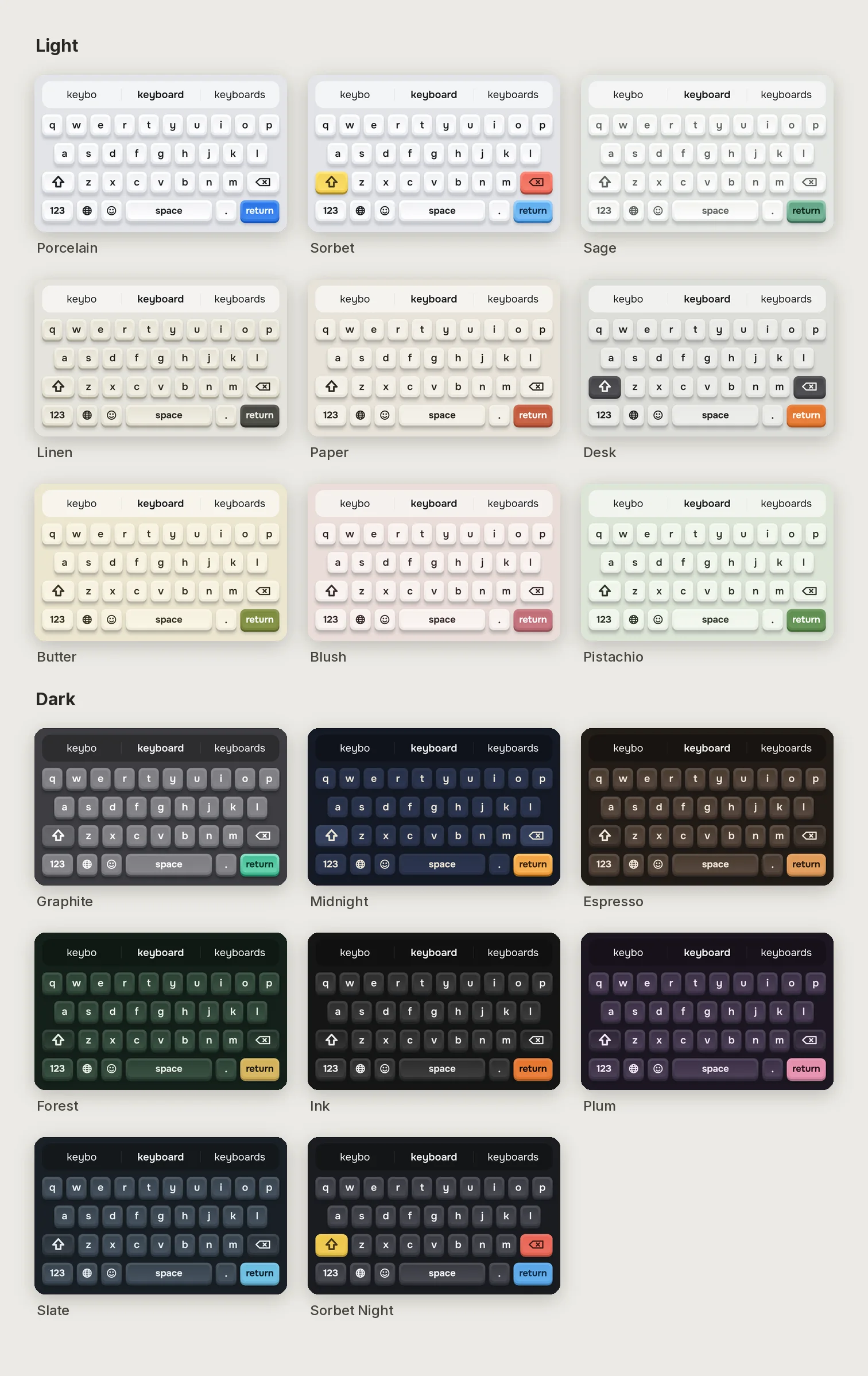
17 palettes. 9 light, 8 dark.
By default the keyboard follows the system: Porcelain by day, Graphite by night. Pick a different pair, or fix one theme. Every palette above in the live keyboard is the app’s, colour for colour.
See all 17 side by side
Settings
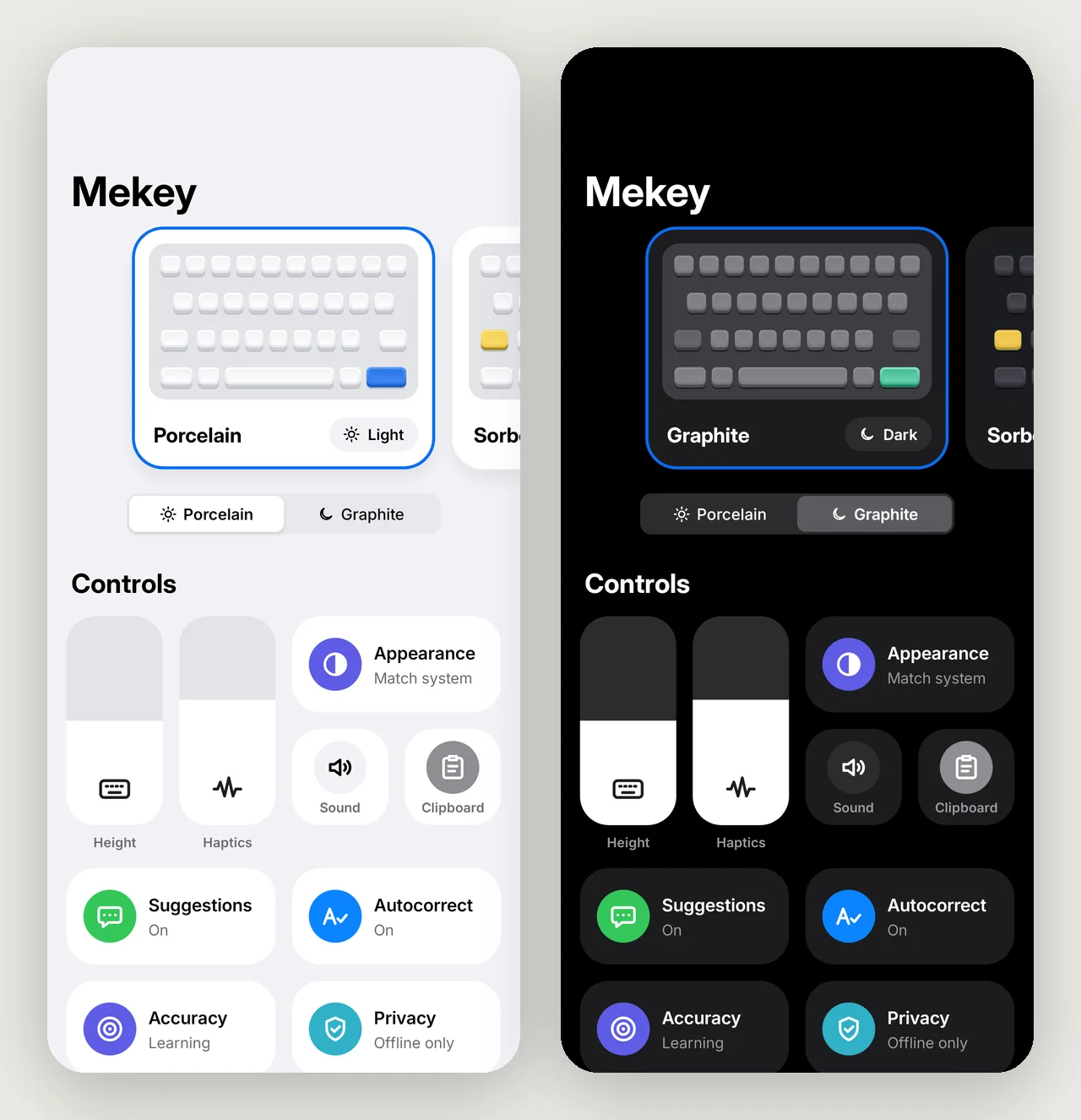
Laid out like Control Centre.
Theme cards swipe sideways. Height and haptics are drag tiles; long-press a tile to open it in place. Suggestions, autocorrect, accuracy, sound and clipboard each get a toggle.
Privacy
No INTERNET permission. Nothing to send it with.
Privacy here comes from what the app is built to do and not do. Its only permission is VIBRATE, used for haptic strength. Dictionaries, fonts and sounds all ship inside the APK. Read the manifest.
Nothing you type is stored.
No personal dictionary, no typing history.
Clipboard history stays in memory.
Up to 10 recent clips of up to 5,000 characters, never written to storage and gone when the keyboard process ends. Clips an app marks as sensitive, such as from a password manager, are never kept.
Password fields get nothing extra.
No surrounding text is read, and there are no suggestions, corrections, emoji row or clipboard row.
Works before you unlock.
After a restart, Mekey types your PIN with the default theme, no dictionary loaded and Settings hidden from the globe menu.
What is stored on the device
| Data | Where | Notes |
|---|---|---|
| Settings and key customisations | settings | Written only when you change something |
| Emoji usage counts | emoji_usage | Emoji and counts only, for the Frequent row and tab |
| Adaptive touch model | touch-model.bin | Only if you turn adaptive touch on. Average touch offsets per key, no characters or words. Excluded from backup; Reset learning deletes it |
App backup is turned off. This website has no analytics, no cookies and makes no third-party requests.
Install
Four steps, about a minute.
Download the APK
Get
mekey-X.Y.Z.apkfrom the latest release. Every release is a signed build from a tagged commit.Allow the install
Android asks you to allow installs from your browser or file manager, once.
Turn Mekey on
Open Mekey. It takes you to Settings → System → Keyboard → On-screen keyboard. The wording varies between phone makers.
Switch to it
Pick Mekey from the keyboard picker. Then hold the globe key for Settings and Customise.
APK from GitHub Releases · Android 8.0+ · Free and open source (Apache-2.0)
Enjoying Mekey?
It is free, has no ads and collects nothing. If it earns a place on your phone, a coffee keeps it going.
Buy me a coffee